pyskindose package
Subpackages
- pyskindose.calculate_dose package
- pyskindose.helpers package
- pyskindose.plotting package
- Submodules
- pyskindose.plotting.create_dose_map_plot module
- pyskindose.plotting.create_geometry_plot module
- pyskindose.plotting.create_geometry_plot_texts module
- pyskindose.plotting.create_irradiation_event_procedure_plot_data module
- pyskindose.plotting.create_layout_for_dose_map_plots module
- pyskindose.plotting.create_mesh3d module
- pyskindose.plotting.create_notebook_dose_map_plot module
- pyskindose.plotting.create_plot_and_save_to_file module
- pyskindose.plotting.create_ploty_ijk_indices module
- pyskindose.plotting.create_setup_and_event_plot module
- pyskindose.plotting.create_wireframes module
- pyskindose.plotting.get_camera_view module
- pyskindose.plotting.get_visual_offset module
- pyskindose.plotting.plot_event module
- pyskindose.plotting.plot_geometry module
- pyskindose.plotting.plot_procedure module
- pyskindose.plotting.plot_settings module
- pyskindose.plotting.plot_setup module
- Module contents
- pyskindose.settings package
- Submodules
- pyskindose.settings.normalization_settings module
NormalizationSettingsNormalizationSettings.trans_offsetNormalizationSettings.trans_dirNormalizationSettings.rot_dirNormalizationSettings.field_size_modeNormalizationSettings.detector_side_lengthNormalizationSettings.to_printable_string()NormalizationSettings.update_attrs_str()NormalizationSettings.update_used_settings()
- pyskindose.settings.patient_offset module
- pyskindose.settings.phantom_dimensions module
PhantomDimensionsPhantomDimensions.plane_lengthPhantomDimensions.plane_widthPhantomDimensions.plane_resolutionPhantomDimensions.cylinder_lengthPhantomDimensions.cylinder_radii_aPhantomDimensions.cylinder_radii_bPhantomDimensions.cylinder_resolutionPhantomDimensions.table_thicknessPhantomDimensions.table_lengthPhantomDimensions.table_widthPhantomDimensions.pad_thicknessPhantomDimensions.pad_widthPhantomDimensions.pad_lengthPhantomDimensions.to_dict_cylinder()PhantomDimensions.to_dict_pad()PhantomDimensions.update_attrs_str()
- pyskindose.settings.phantom_settings module
- pyskindose.settings.plot_settings module
- pyskindose.settings.pyskindose_settings module
- pyskindose.settings.rotation_direction module
- pyskindose.settings.translation_direction module
- pyskindose.settings.translation_offset module
- Module contents
Submodules
pyskindose.analyze_data module
- analyze_data(normalized_data: DataFrame, settings: str | dict | PyskindoseSettings) Dict[str, Any] | str | PySkinDoseOutput
Analyze data och settings, and runs PySkinDose in desired mode.
- Parameters:
normalized_data (pd.DataFrame) – RDSR data, normalized for compliance with PySkinDose.
settings (Union[str, dict, PyskindoseSettings]) – Settings class for PySkinDose
- Returns:
output dictionary containing calculation specifics such as dose map, correction factors, etc.
- Return type:
Dict[str, Any]
pyskindose.beam_class module
- class Beam(data_norm: DataFrame, event: int = 0, plot_setup: bool = False)
Bases:
objectA class used to create an X-ray beam and detector.
- r
5*3 array, locates the xyz coordinates of the apex and verticies of a pyramid shaped X-ray beam, where the apex represents the X-ray focus (row 1) and the vertices where the beam intercepts the X-ray detector (row 2-5)
- Type:
np.array
- ijk
A matrix containing vertex indices. This is required in order to plot the beam using plotly Mesh3D. For more info, see “i”, “j”, and “k” at https://plot.ly/python/reference/#mesh3d
- Type:
np.array
- det_r
8*3 array, where each row locates the xyz coordinate of one of the 8 corners of the cuboid shaped X-ray detector
- Type:
np.array
- det_ijk
same as ijk, but for plotting the X-ray detector
- Type:
np.array
- N
4*3 array, where each row contains a normal vector to one of the four faces of the beam.
- Type:
np.array
- check_hit(patient: Phantom) List[bool]
Calculate which patient entrance skin cells are hit by the beam.
A description of this algoritm is presented in the wiki, please visit https://pyskindose.readthedocs.io/en/latest/
- Parameters:
patient (Phantom) – Patient phantom, either of type plane, cylinder or human, i.e. instance of class Phantom
- Returns:
A boolean list of the same length as the number of patient skin cells. True for all entrance skin cells that are hit by the beam.
- Return type:
List[bool]
pyskindose.constants module
pyskindose.corrections module
- calculate_k_bs(data_norm: DataFrame) List[CubicSpline]
Calculate backscatter correction.
This function calculates the backscatter correction factor for all events, at field sizes [5, 10, 20, 25, 35] cm^2. The function uses the non-linear interpolation method presented by Benmakhlouf et al. in the article “Influence of phantom thickness and material on the backscatter factors for diagnostic x-ray beam dosimetry”, [doi:10.1088/0031-9155/58/2/247]
- Parameters:
data_norm (pd.DataFrame) – RDSR data, normalized for compliance with PySkinDose.
- Returns:
List of scipy cubic spline interpolation object for all events.
- Return type:
List[CubicSpline]
- calculate_k_isq(source: array, cells: array, dref: float) array
Calculate the IRP air kerma inverse-square law correction.
This function corrects the X-ray fluence from the interventionl reference point (IRP), to the actual source to skin distance, so that the IRP air kerma is converted to air kerma at the patient skin surface.
- Parameters:
source (np.array) – location of the X-ray source
cells (np.array) – location of all the cells that are hit by the beam
dref (float) – reference distance source to IRP, i.e. the distance at which the IRP air kerma is stated.
- Returns:
Inverse-square law correction for all cells that are hit by the beam.
- Return type:
np.array
- calculate_k_med(data_norm: DataFrame, field_area: List[float], event: int, corrections_db: str) float
Calculate medium correction.
This function calculates and appends the medium correction factor for all skin cells that are hit by the X-ray beam in an event. The correction factors are from the article “Backscatter factors and mass energy-absorption coefficient ratios for surface dose determination in diagnostic radiology”.
- Parameters:
data_norm (pd.DataFrame) – RDSR data, normalized for compliance with PySkinDose.
field_area (List[float]) – X-ray field area in (cm^2) for each phantom skin cell that are hit by the X-ray beam.
event (int) – Irradiation event index.
corrections_db (str) – A string defining the path to the corrections SQLite db
- Returns:
Medium correction k_med for all cells that are hit by the beam.
- Return type:
float
- calculate_k_tab(data_norm: DataFrame, corrections_db: str, estimate_k_tab: bool = False, k_tab_val: float = 0.8) List[float]
Fetch table correction factor from database.
This function fetches measured table correction factor as a function of HVL and kVp. Further, if no measurement are conducted on a specific unit, the function can also return user specified estimated table correction.
- Parameters:
data_norm (pd.DataFrame) – RDSR data, normalized for compliance with PySkinDose.
estimate_k_tab (bool) – Set to True to use estimated table correction, default is False.
k_tab_val (float) – Value of estimated table corrections, must be in range (0, 1).
corrections_db (str) – A string defining the path to the corrections SQLite db
- Returns:
List of table correction factor for all events in procedure.
- Return type:
List[float]
pyskindose.db_connect module
- db_connect(db_name: str)
Set up the database connection with tables needed for PSD calculations.
- Parameters:
db_name (str, optional) – The name of/path to the sqlite3 database to connect to and if it doesn’t exist, create, by default ‘corrections.db’
- Returns:
conn – connection to database
cursor – cursor to database connection
pyskindose.dev_data module
pyskindose.geom_calc module
- class Triangle(p: array, p1: array, p2: array)
Bases:
objectA class used to create triangles.
This class creates a triangle from a set of three coordinates in 3D carthesian space. The purpose of this class is to use it to calculate if a 3D segment intercepts the triangle.
- p
Carthesian 3D coordinates to the central vertex of the triangle
- Type:
np.array
- p1
Vector from p to first vertex
- Type:
np.array
- p2
Vector from p to second vertex
- Type:
np.array
- n
normal vector to the triangle, pointing upwards (negative y direction).
- Type:
np.array
- check_intersection(start: array, stop: array) List[bool]
Check if a 3D segment intercepts with the triangle.
Check if a 3D segment intercepts with the triangle. For our purpose, the 3D segment represents an X-ray beam from the X-ray source to the phantom skin cell and the triangle represent parts of the patient support table. If the beam intercepts, table- and pad fluence correction should be conducted when calculating skin dose for that particular cell.
- Parameters:
start (np.array) – Carthesian 3D coordinates to the starting point of the segment.
stop (np.array) – Carthesian 3D coordinates to the end points of the segment. Note, can be several points, e.g, several skin cells.
- Returns:
List[bool]
Boolean list which specifies whether each segment between start
and each of coordinates in stop are intercepted by the triangle.
- calculate_field_size(field_size_mode, data_parsed, data_norm)
Calculate X-ray field size at image recepter plane.
- Parameters:
field_size_mode (str) –
Choose either ‘CFA’ (‘collimated field area) or ‘ASD’ (actual shutter distance).
If field_size_mode = ‘CFA’, the field side in lateral- and longutudinal direction are set equal to the square root of the collimated field area. NOTE, this should only be used when actual shutter distances are unavailabe.
If field_size_mode = ‘ASD’, the function calculates the field size by distance scaling the actual shutter distance to the detector plane
data_parsed (pd.DataFrame) – Parsed RDSR data from all irradiation events in the RDSR input file, i.e. output of function rdsr_parser
data_norm (pd.DataFrame) – RDSR data, normalized for compliance with PySkinDose.
- Returns:
FS_lat, FS_long – Field size in lat- and long direction in cm at the detector plane.
- Return type:
float
- check_new_geometry(data_norm: DataFrame) List[bool]
Check which events has unchanged geometry since the event before.
This function is intended to calculate if new geometry parameters needs to be calculated, i.e., new beam, geometry positioning, field area and cell hit calculation.
- Parameters:
data_norm (pd.DataFrame) – RDSR data, normalized for compliance with PySkinDose.
- Returns:
List of booleans where True[event] means that the event has updated geometry since the preceding irradiation event.
- Return type:
List[bool]
- check_table_hits(source: array, table: Phantom, beam, cells: array) List[bool]
Check which skin cells are blocket by the patient support table.
This fuctions creates two triangles covering the entire surface of the patient support table, and checks if the skin cells are blocked by the table. This is conducted in order to be able to append table and pad correction factor k_(T+P) when required.
- Parameters:
source (np.array) – Carthesian 3D coordinates to the X-ray souce
table (Phantom) – Patient support table, i.e., instance of class phantom with phantom_type=”table”
beam (Beam) – X-ray beam, i.e., instance of class Beam.
cells (np.array) – List of skin cells to be controlled if the patient support table and pad blocks the beam before it reached the them.
- Returns:
Boolean list of the statuses of each skin cell. True if the path from X-ray source to skin cell is blocked by the table (any of the two triangles), else false. Start points above triangle returns False, to not include hits where the table does not block the beam.
- Return type:
List[bool]
- convert_from_m_to_cm(val_in_m: float) float
Convert a length from centimeters to millimeters.
- Parameters:
val_in_m (float) – A length in m
- Returns:
The same length in cm
- Return type:
float
- convert_from_mm_to_cm(val_in_mm: float) float
Convert a length from millimeters to centimeters.
- Parameters:
val_in_mm (float) – A length in mm
- Returns:
The same length in cm
- Return type:
float
- fetch_and_append_hvl(data_norm: DataFrame, inherent_filtration: float, corrections_db: str) DataFrame
Add event HVL to RDSR event data from database.
- Parameters:
data_norm (pd.DataFrame) – RDSR data, normalized for compliance with PySkinDose.
inherent_filtration (float) – X-ray tube inherent filtration in mmAl.
corrections_db (str) – A string defining the path to the corrections SQLite db
- Returns:
This function appends event specific HVL (mmAl) as a function of device model, kVp, and copper- and aluminum filtration to the normalized RDSR data in data_norm and returns the DataFrame with the HVL info appended.
- Return type:
data_norm
- position_patient_phantom_on_table(patient: Phantom, table: Phantom, pad: Phantom, pad_thickness: Any, patient_offset: List[int], patient_orientation: head_first_supine) None
Places the patient phantom upon the patient support table.
In this function, the patient phantom is positioned to the starting position for the procedure. This is done by rotating and translating the patient so that the correct starting position is achieved.
- Parameters:
patient (Phantom) – Patient phantom, either plane, cylinder or human.
table (Phantom) – Table phantom to represent the patient support table
pad (Phantom) – Pad phantom to represent the patient support pad
pad_thickness (Any) – Patient support pad thickness
patient_offset (List[int]) – Offsets the patient phantom from the centered along the head end of the table top, given as [Tx: <int>, “Ty”: <int>, “Tz”: <int>] in cm.
patient_orientation (str) – patient orientation upon table. Choose between c.PATIENT_ORIENTATION_HEAD_FIRST_SUPINE and c.PATIENT_ORIENTATION_FEET_FIRST_SUPINE.
- scale_field_area(data_norm: DataFrame, event: int, patient: Phantom, hits: List[bool], source: array) List[float]
Scale X-ray field area from image detector, to phantom skin cells.
This function scales the X-ray field size from the point where it is stated in data_norm, i.e. at the image detector plane, to the plane at the phantom skin cell. This is the field size of interest since this area is required as input for k_med and k_bs correction factor calculations. This function conducts this scaling for all skin cells that are hit by the X-ray beam in a specific irradiation event.
- Parameters:
data_norm (pd.DataFrame) – RDSR data, normalized for compliance with PySkinDose.
event (int) – Irradiation event index.
patient (Phantom) – Patient phantom, i.e. instance of class Phantom.
hits (List[bool]) – A boolean list of the same length as the number of patient skin cells. True for all entrance skin cells that are hit by the beam for a specific irradiation event.
source (np.array) – (x,y,z) coordinates to the X-ray source
- Returns:
X-ray field area in (cm^2) for each phantom skin cell that are hit by X-ray the beam
- Return type:
List[float]
- vector(start: array, stop: array, normalization=False) array
Create a vector between two points in carthesian space.
This function creates a simple vector between point <start> and point <stop> The function can also create a unit vector from <start>, in the direction to <stop>.
- Parameters:
start (np.array) – Starting point of the vector
stop (np.array) – Stopping point of the vector
normalization (bool, optional) – Toggle normalization (the default is False, which implies no normalization)
- Returns:
A vector from “start” to “stop”, or if normalization=True, a unit vector from “start” in the direction towards “stop”.
- Return type:
np.array
pyskindose.main module
- analyze_normalized_data_with_custom_settings_object(data_norm: DataFrame, settings: PyskindoseSettings | str | dict, output_format: str | None = 'json') str | dict
Run PySkinDose with custom normalized data and a custom specified settings objects.
See the
- Parameters:
data_norm (pd.DataFrame) – A pandas DataFrame containing the normalized data
settings (Union[PySkinDoseSettings, str, dict]) – The settings for the PySkinDose analysis given as a PySKinDoseSettings object, a json-formatted string or a dict
output_format (str, optional) – String specifying the output format. Valid values are “json”(default) and “dict”
- get_argument_parser(arguments) Namespace
- main(file_path: str | None = None, settings: str | dict | PyskindoseSettings = None)
Run PySkinDose.
Copy settings_examples.json and save it as settings.json. Set all you parameters in this file. For debugging and developement, the PARAM_dev settings dictionary can be used by calling main(settings=PARAM_DEV).
See settings.py for a description of all the parameters. Please visit https://github.com/rvbCMTS/PySkinDose for info on how to run PySkinDose.
- Parameters:
file_path (str, optional) – file path to RDSR file or preparsed RDSR data in .json format
settings (Union[str, dict, PyskindoseSettings], optional) – Setting file in either dict, json string format, or as a PyskindoseSettings object. By default, settings_examples.json is enabled.
pyskindose.phantom_class module
- class Phantom(phantom_model: str, phantom_dim: PhantomDimensions, human_mesh: str | tuple[str, Mesh] | None = None)
Bases:
objectCreate and handle phantoms for patient, support table and pad.
This class creates a phantom of any of the types specified in VALID_PHANTOM_MODELS (plane, cylinder or human to represent the patient, as well as patient support table and pad). The patient phantoms consists of a number of skin cells where the skin dose can be calculated.
- phantom_model
Type of phantom, i.e. “plane”, “cylinder”, “human”, “table” or “pad”
- Type:
str
- r
n*3 array where n are the number of phantom skin cells. Each row contains the xyz coordinate of one of the phantom skin cells
- Type:
np.ndarray
- ijk
A matrix containing vertex indices. This is required in order to plot the phantom using plotly Mesh3D. For more info, see “i”, “j”, and “k” at https://plot.ly/python/reference/#mesh3d
- Type:
np.array
- dose
An empty 1d array to store skin dose calculation for each of the n phantom cells. Only for patient phantom types (plane, cylinder, human)
- Type:
np.array
- n
normal vectors to each of the n phantom skin cells. (only for 3D patient phantoms, i.e. “cylinder” and “human”)
- Type:
np.array
- r_ref
Empty array to store of reference position of the phantom cells after the phantom has been aligned in the geometry with the position_patient_phantom_on_table function in geom_calc.py
- Type:
np.array
- table_length
length of patient support table. The is needed for all phantom object to select correct rotation origin for At1, At2, and At3.
- Type:
float
- position(data_norm: DataFrame, event: int) None
Position the phantom for a event by adding RDSR table displacement.
Positions the phantom from reference position to actual position according to the table displacement info in data_norm.
- Parameters:
data_norm (pd.DataFrame) – Table containing dicom RDSR information from each irradiation event See rdsr_normalizer.py for more information.
event (int) – Irradiation event index
- rotate(angles: List[int]) None
Rotate the phantom about the angles specified in rotation.
- Parameters:
angles (List[int]) – list of angles in degrees the phantom should be rotated about, given as [x_rot: <int>, y_rot: <int>, z_rot: <int>]. E.g. rotation = [0, 90, 0] will rotate the phantom 90 degrees about the y-axis.
- save_position() None
Store a reference position of the phantom.
This function is supposed to be used to store the patient fixation conducted in the function position_patient_phantom_on_table
- translate(dr: List[int]) None
Translate the phantom in the x, y or z direction.
- Parameters:
dr (List[int]) – list of distances the phantom should be translated, given in cm. Specified as dr = [dx: <int>, dy: <int>, dz: <int>]. E.g. dr = [0, 0, 10] will translate the phantom 10 cm in the z direction
pyskindose.rdsr_normalizer module
- rdsr_normalizer(data_parsed: DataFrame, settings: PyskindoseSettings) DataFrame
Normalize RDSR data for PySkinDose compliance.
- Parameters:
data_parsed (pd.DataFrame) – Parsed RDSR data from all irradiation events in the RDSR input file, i.e. output of function rdsr_parser
settings (PyskindoseSettings) – The PySkinDose settings object containing the normalization settings
- Returns:
data_norm (pd.DataFrame) –
- DataFrame with the following columns
- model (str)
device model, e.g. ‘AXIOM-artis
- DSD (float)
Distance Source to detector (DSD) in cm.
- DSI (float)
Distance Source to Isocenter (DSI) in cm.
- DID (float)
Distance Isocenter to Detector (DID) in cm.
- DSIRP (float)
Distance Source to intercentional reference point (DSIRP) in cm.
- acquisition_type (str)
Type of irradiation event, i.e. ‘fluoroscopy, or stationary acquisition.
- acquisition_plane (str)
plane used for image acquisition. Either ‘single plane’, ‘plane a’, or ‘plane b’.
- Tx (float)
Table offset in x-direction (longitudinal direction) from the machine isocenter. At Tx = 0, the patient support table is centered about the isocenter x-axis. With patient lying in head-first supine position (default settings), Tx increases in patient left lateral direction.
- Ty (float)
Table offset in y-direction (vertical direction) from the machine isocenter. At Ty = 0, the patient support table is entered about the isocenter y-axis. Ty is increasing downwards, i.e. along the force of gravity.
- Tz (float)
Table offset in z-direction (lateral direction) from the machine isocenter. At Tz = 0, the head end of the patient support tables are located at the zero coordinate of the z-axis. With patient lying in head-first supine position (default settings), Tz increases in the patients cranial direction.
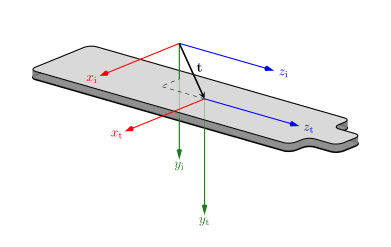
- At1 (int)
Rotation angle of the patient support table about the isocenter y-axis. The center of rotation is located at the centerpoint of the table. Positive direction is determined by the right-hand rule for curve orientation about the positive isocenter y-axis.
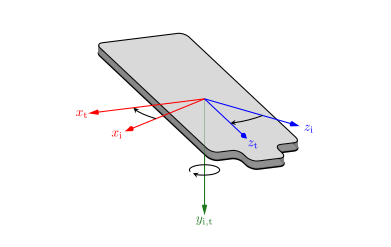
- -At2 (int)
Tilt angel of the patient support table about the isocenter x-axis. The center of the tilt is located at the center of the table, with positive direction determined by the right-hand rule for curve orientations about the positiove isocenter x-axis.
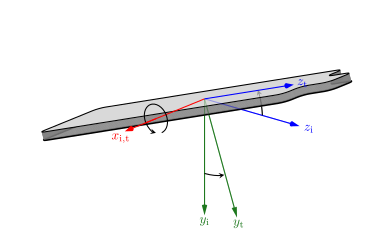
- At3 (int)
Cradle angle of the patient support table about the isocenter z-axis. The center of rotation is located at the centerpoint of the table. Positive direction is determined by the right-hand rule for curve orientation about the positive isocenter z-axis.
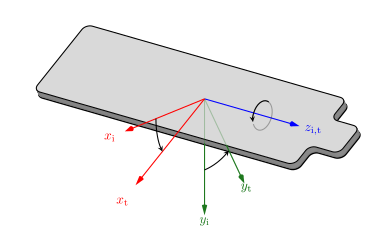
- Ap1 (int)
Rotation angle of the X-ray source about the isocenter z-axis. Positive direction is determined by the right-hand rule for curve orientation about the positive isocenter z-axis.
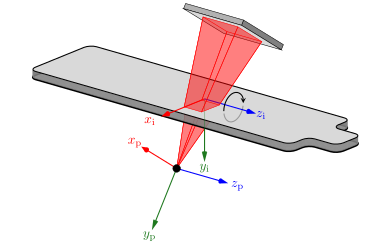
- Ap2 (int)
Rotation angle of the X-ray source about the isocenter x-axis. Positive direction is determined by the right-hand rule for curve orientation about the positive isocenter x-axis.
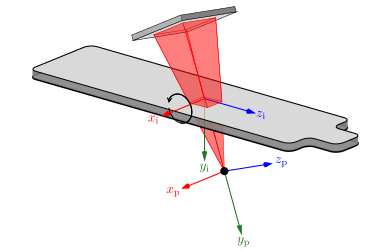
Ap3 (int) – Rotation angle of the X-ray detector about the isocenter y-axis. Positive direction is determined by the right-hand rule for curve orientation about the positive isocenter y-axis.
- DSLfloat
Detector Side Length (DSL) in cm.
- FS_latfloat
Side length of the X-ray field in the lateral direction at the image receptor plane.
- FS_longfloat
Side length of the X-ray field in the longitudinal direction at the image receptor plane.
- kVpfloat
Tube voltage in kV
- K_IRPfloat
IRP air kerma at the Interventional Reference Point (IRP).
- filter_thickness_Cufloat
Copper X-ray filter thickness in mm.
- filter_thickness_Alfloat
Aluminum X-ray filter thickness in mm.
pyskindose.rdsr_parser module
- rdsr_parser(data_raw: FileDataset, silence_pydicom_warnings=False) DataFrame
Parse event data from radiation dose structure reports (RDSR).
- Parameters:
data_raw (pydicom.FileDataset) – RDSR file from fluoroscopic device, opened with package pydicom.
- Returns:
Parsed RDSR data from all irradiation events in the RDSR input file
- Return type:
pd.DataFrame
Module contents
- get_path_to_example_rdsr_files()
- load_settings_example_json() dict
- print_available_human_phantoms()
- print_example_rdsr_files()